LDAP Authentication with 2FA on Kubernetes
Complete LDAP authentication solution with two-factor authentication, self-service password management, and GitOps capabilities on Amazon EKS

Content Index
Project Overview
This project deploys a complete LDAP authentication solution with two-factor authentication (2FA), self-service password management, and GitOps capabilities on Amazon EKS using Terraform.
Core Infrastructure
- EKS Cluster (Auto Mode) with IRSA for secure pod-to-AWS-service authentication
- VPC with public/private subnets and VPC endpoints for private AWS service access
- Application Load Balancer (ALB) via EKS Auto Mode for internet-facing access
- Route53 DNS integration for domain management
- ACM Certificates for HTTPS/TLS termination
LDAP Stack
- OpenLDAP Stack with high availability and multi-master replication
- PhpLdapAdmin web interface for LDAP administration
- LTB-passwd self-service password management UI
2FA Application
- Full-stack 2FA application with Python FastAPI backend and static HTML/JS/CSS frontend
- Backend: Comprehensive FastAPI backend API with LDAP integration, PostgreSQL, Redis, AWS SES/SNS, and complete documentation
- Frontend: Modern SPA frontend with vanilla JavaScript, responsive design, and full feature documentation
- Dual MFA methods: TOTP (authenticator apps) and SMS (AWS SNS)
- LDAP integration for centralized user authentication
- Self-service user registration with email/phone verification and profile state management
- Admin dashboard for user management, group CRUD operations, and approval workflows
- User profile management with email change (verification link), phone change (SMS code), and password change for authenticated users
- Interactive API documentation via Swagger UI and ReDoc (always enabled)
Supporting Infrastructure
- PostgreSQL (Bitnami Helm chart, ECR images) for user registration data and email verification token storage with persistent EBS-backed storage
- Redis (Bitnami Helm chart) for SMS OTP code and login challenge storage with TTL-based automatic expiration and shared state across replicas (required; no in-memory fallback)
- AWS SES for email verification and notifications with IRSA-based access (no hardcoded credentials)
- AWS SNS for SMS-based 2FA verification (optional, requires SNS VPC endpoint enabled in backend infrastructure)
DevOps & Security
- ArgoCD (AWS EKS managed service) for GitOps deployments with AWS Identity Center authentication
- Network Policies for securing pod-to-pod communication with cross-namespace support
- IRSA (IAM Roles for Service Accounts) for secure AWS API access from pods without credentials
- VPC Endpoints for private AWS service access (SSM, STS, SNS) without internet exposure
- Multi-Account Architecture with separated state storage and deployment accounts
- S3 File-Based Locking for Terraform state management (migrated from DynamoDB)
Key Features
- EKS Auto Mode: Simplified cluster management with automatic load balancer provisioning and built-in EBS CSI driver
- Two-Factor Authentication: Full-stack 2FA application with dual MFA methods (TOTP and SMS)
- Self-Service User Registration: Email and phone verification with profile state management (PENDING → COMPLETE → ACTIVE)
- Admin Dashboard: User management, group CRUD operations, approval workflows, and user profile management
- IRSA Integration: Secure AWS API access from pods without hardcoded credentials via OIDC
- High Availability: Multi-master OpenLDAP replication with persistent storage
- GitOps Ready: ArgoCD (AWS managed service) for declarative, Git-driven deployments
- Multi-Account Architecture: Separation of state storage (Account A) and resource deployment (Account B) for enhanced security
- API Documentation: Interactive Swagger UI and ReDoc always available at
/api/docsand/api/redoc(always enabled, not just in debug mode) - Secrets Management: Passwords managed via GitHub repository secrets (for CI/CD) or AWS Secrets Manager (for local deployment) with automated retrieval
- Public ACM Certificates: Uses public ACM certificates (Amazon-issued) with DNS validation for browser-trusted certificates (no security warnings)
- Route53 Record Module: Dedicated module for Route53 A (alias) records with cross-account support and ALB zone_id mapping
- Automated Configuration Management: ECR repository name automatically saved to GitHub variables during backend infrastructure provisioning (eliminates manual configuration steps)
- ArgoCD Status Validation: Automatic validation that ArgoCD capability is "ACTIVE" before deploying applications (prevents deployment failures due to incomplete ArgoCD setup)
- Role Assumption Script: Convenient
scripts/assume-github-role.shscript for switching between AWS account roles (State, Development, Production) when working in the terminal - Unique Build Image Tags: Backend and frontend build workflows use commit SHA plus run ID for image tags (
<name>-<sha>-<run_id>), push only that tag to ECR (no:latest), and update Helm values; application provisioning reads tags from Helm values - ArgoCD Access Entry: ArgoCD Capability uses EKS Access Policy association for cluster admin permissions, ensuring reliable GitOps sync across namespaces and cluster-scoped resources
Getting Started
Prerequisites
- Two AWS Accounts minimum — split architecture. Quick reference:
Resource Account A (State) Account B (Deployment) Terraform state (S3) ✓ AWS Secrets Manager (github-role, tf-vars, external-id) ✓ Route53 Hosted Zone ✓ Route53 DNS records (incl. ACM validation CNAMEs) ✓ ACM Certificate (requested, validated, stored) ✓ (each dev/prod) SMS Sender ID (when using SMS 2FA) ✓ (each dev/prod) EKS, VPC, ALB, ECR, application resources ✓ Account A holds state, secrets, and DNS. Account B holds infrastructure and ACM certificates (ALB and certificate must be in the same account).
- GitHub Account and repository fork: ldap-2fa-on-k8s
- AWS SSO/OIDC configured (see GitHub Repository Configuration)
- Domain and DNS (Account A): Route53 hosted zone for your domain must exist in the State Account. All DNS records (including ACM validation CNAMEs) are created here.
- ACM certificates (Account B): Request a public ACM certificate in each Deployment Account. Validation uses CNAME records in Account A's Route53. Certificate must be in
ISSUEDstatus and in the same region as the EKS cluster. See Public ACM Certificate Setup and DNS Validation for step-by-step AWS CLI commands. - SMS (Account B, when using SMS 2FA): (1) SMS Sandbox: New SNS accounts are in the SMS sandbox. Add and verify destination phone numbers in SNS Console > Text messaging (SMS) > Sandbox destination phone numbers, or request Exit SMS Sandbox for production. See SMS Sandbox. (2) Sender ID: Request an SMS Sender ID in AWS End User Messaging per deployment account and share with SNS. See SMS Sender ID Setup.
- GitHub Secrets and Variables configured (see Secrets Requirements for complete details):
- Required Secrets:
AWS_STATE_ACCOUNT_ROLE_ARNAWS_PRODUCTION_ACCOUNT_ROLE_ARNAWS_DEVELOPMENT_ACCOUNT_ROLE_ARNAWS_ASSUME_EXTERNAL_IDTF_VAR_OPENLDAP_ADMIN_PASSWORDTF_VAR_OPENLDAP_CONFIG_PASSWORDTF_VAR_REDIS_PASSWORDTF_VAR_POSTGRESQL_PASSWORDGH_TOKEN
- Optional (first admin user seed): When all are set, a one-time Job seeds the first admin so they can log into the 2FA app with the same username/password as LDAP. Set in GitHub Secrets or AWS
tf-vars:ADMIN_SEED_USERNAME,ADMIN_SEED_EMAIL,ADMIN_SEED_FIRST_NAME,ADMIN_SEED_LAST_NAME,ADMIN_SEED_PHONE_COUNTRY_CODE,ADMIN_SEED_PHONE_NUMBER. See Secrets Requirements. - Required Variables:
AWS_REGIONBACKEND_PREFIXAPPLICATION_INFRA_PREFIX- State file key prefix for application infrastructure (value:application_infra_state/terraform.tfstate)APPLICATION_PREFIX- State file key prefix for application (value:application_state/terraform.tfstate)
- Auto-generated Variables: (set automatically by workflows/scripts)
BACKEND_BUCKET_NAME- Set by Terraform backend state provisioningECR_REPOSITORY_NAME- Automatically set by backend infrastructure provisioning (eliminates manual configuration; retrieved from Terraform outputs and saved to GitHub repository variables)
Note on State File Isolation: The
APPLICATION_INFRA_PREFIXandAPPLICATION_PREFIXvariables ensure that infrastructure and application state files are stored separately in the same S3 bucket, preventing state conflicts. Both directories use the sameBACKEND_BUCKET_NAMEbut different keys for complete isolation. - Required Secrets:
- For Local Deployment: GitHub CLI (
gh), AWS CLI, Terraform, kubectl, andjqinstalled and configured - For Local Deployment: Docker must be installed and running for ECR image mirroring. The
scripts/mirror-images-to-ecr.shscript requires Docker to pull images from Docker Hub and push them to ECR. This step is automatically executed bysetup-application-infra.shbefore Terraform operations. - For Local Deployment: AWS Secrets Manager configured with
github-role,tf-vars, andexternal-idsecrets (see Secrets Requirements)
For detailed prerequisites and setup: Prerequisites | Secrets Configuration | Secrets Requirements
Deployment Options
Deployment Comparison
| Feature | Local Deployment | GitHub Actions |
|---|---|---|
| Setup Complexity | Medium (requires local tools) | Low (web-based) |
| Best For | Development, testing | Production, CI/CD |
| Requires GitHub CLI | Yes | No |
| Requires GitHub Secrets | Optional (can use env vars) | Required |
| Automation Level | Script-based | Fully automated |
Deployment Order
The deployment follows a three-tier approach that must be executed in order. Each tier depends on the previous one:
- Deploy Terraform Backend State Infrastructure
- Purpose: Creates S3 bucket for storing Terraform state files
- Components: S3 bucket with versioning, encryption, and file-based locking
- Account: State Account (Account A)
- Local:
cd tf_backend_state && ./set-state.sh(or./tf_backend_state/set-state.shfrom repo root; scripts change to their directory automatically) - GitHub Actions: "00 - TF Backend State Provisioning" (
00-tfstate_infra_provisioning.yaml); defaultsAWS_REGIONtous-east-1when not set - See: Terraform Backend State README
- Deploy Backend Infrastructure
- Purpose: Creates foundational AWS infrastructure for Kubernetes workloads
- Components: VPC with public/private subnets, EKS cluster (Auto Mode), VPC endpoints (SSM, STS, SNS), IRSA (OIDC provider), ECR repository
- Account: Deployment Account (Account B)
- Prerequisites: Terraform backend state must be deployed first
- Local:
cd backend_infra && ./setup-backend.sh - GitHub Actions: "01 - Backend Infra Provisioning" (
01-backend_infra_provisioning.yaml) - See: Backend Infrastructure README
- Deploy Application Infrastructure
- Purpose: Deploys LDAP stack, supporting services, ALB, Route53 records, and infrastructure for 2FA application on the EKS cluster
- Components: OpenLDAP stack (HA), PhpLdapAdmin, LTB-passwd, ALB, Route53 records (for phpldapadmin and ltb-passwd), ArgoCD Capability (optional), StorageClass
- Account: Deployment Account (Account B)
- Prerequisites: Backend infrastructure (EKS cluster) must be deployed first
- Additional Requirements: Route53 hosted zone (Account A) and ACM certificate (Account B) must exist
- Route53 hosted zone in State Account; ACM certificate in Deployment Account (ALB and cert must be in same account)
- Automatically accessed via
state_account_role_arnfor Route53 (injected by scripts/workflows) - See Cross-Account Access Documentation for configuration details
- Local:
cd application_infra && ./setup-application-infra.sh - GitHub Actions: "02 - Application Infra Provisioning" (
02-application_infra_provisioning.yaml) - See: Application Infrastructure README | Application Deployment README
- Build Container Images
- Purpose: Build and push backend and frontend container images to ECR
- Required: Must be completed BEFORE deploying the application
- Workflows: "03 - Backend Build and Push" (
03-backend_build_push.yaml) and "03 - Frontend Build and Push" (03-frontend_build_push.yaml) (can run in parallel) - Note: These workflows update Helm values.yaml files with new image tags and commit changes to git
- Deploy Application
- Purpose: Deploys the 2FA application components, including PostgreSQL, Redis, SES, SNS, ArgoCD Applications, and the 2FA application (backend/frontend)
- Components: PostgreSQL (user registration data), Redis (SMS OTP and login challenge storage), AWS SES (email verification), AWS SNS (SMS 2FA), ArgoCD Applications (GitOps), Route53 record (for 2FA app), Backend application (Python FastAPI), Frontend application (HTML/JS/CSS + nginx)
- Account: Deployment Account (Account B)
- Prerequisites: Application infrastructure (Step 3) must be deployed first, including StorageClass, ArgoCD Capability, and ALB DNS name. Container images must be built and pushed to ECR before deployment (see Build Container Images step above).
- Local:
cd application && ./setup-application.sh - GitHub Actions: "04 - Application Provisioning" (
04-application_provisioning.yaml) - See: Application Deployment README for complete deployment guide
- Note: The 2FA application backend and frontend can be deployed via ArgoCD Applications (if enabled) or manually using Helm charts. See Deploying the 2FA Application for manual deployment instructions.
Destroy Order: Always destroy in reverse order: Application → Application Infrastructure → Backend Infrastructure → State
For detailed deployment information: Deployment Methods | Deployment Overview
Architecture
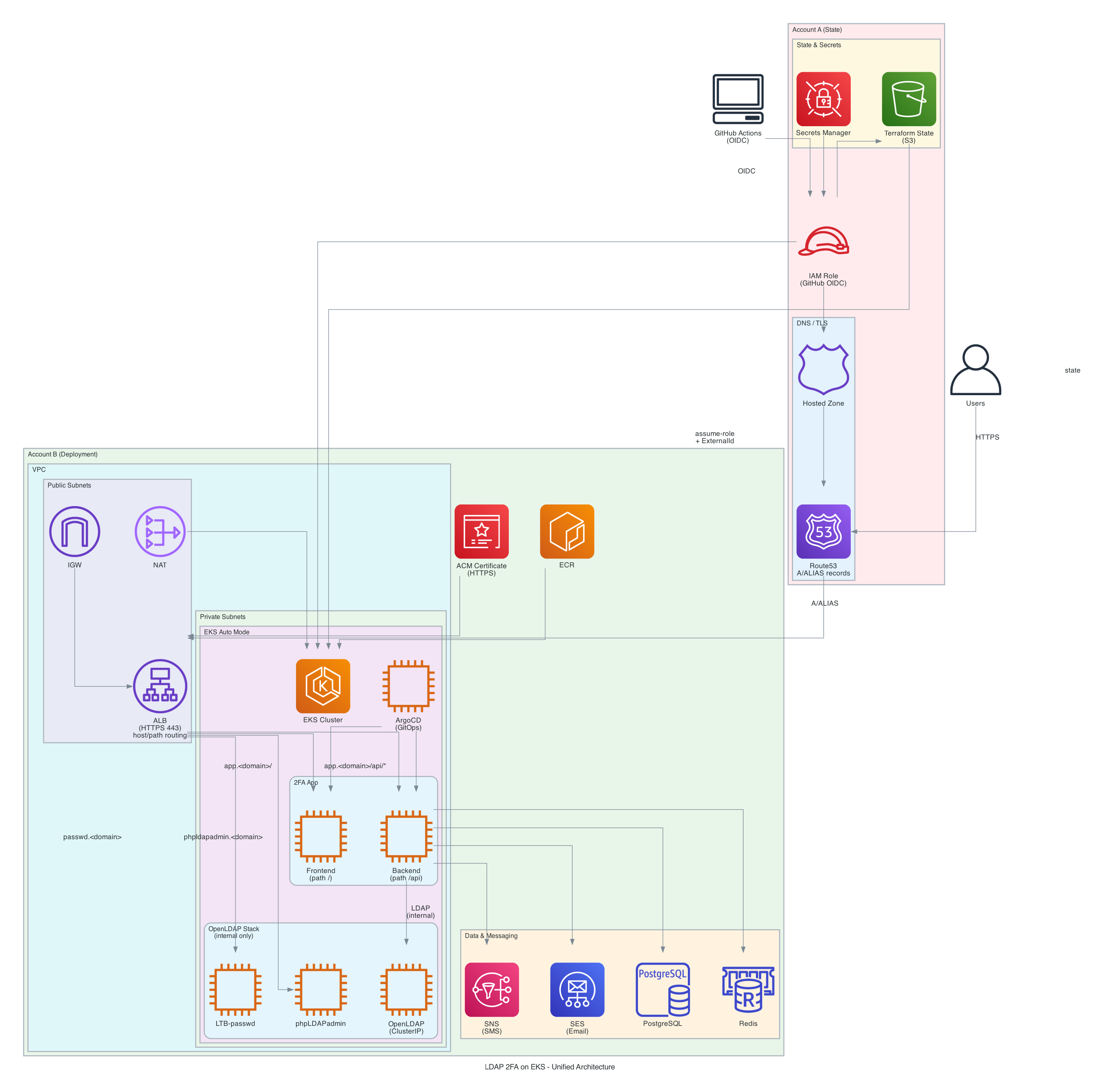
Multi-Account Architecture
This project uses a multi-account architecture for enhanced security. See the Prerequisites table above for a quick reference of what resides in each account.
- Account A (State Account): Holds shared, centrally managed resources
- Terraform state: S3 bucket with versioning, encryption, and file-based locking
- AWS Secrets Manager: Secrets
github-role,tf-vars,external-id(role ARNs, passwords, ExternalId for local scripts) - Route53 Hosted Zone: Domain and DNS; CNAME records for ACM validation are created here
- GitHub Actions authenticates with Account A via OIDC for backend operations and Route53
- IAM-based access control (no access keys required)
- Account B (Deployment Account): Holds infrastructure and applications
- EKS cluster, VPC, ALB, ECR, application workloads
- ACM Certificates: Requested and stored here (ALB and certificate must be in the same account); validated via CNAME records in Account A's Route53
- Separate roles for production and development environments (optional)
- Terraform provider assumes Account B role via cross-account role assumption
For detailed architecture documentation: Multi-Account Architecture | Terraform Backend State README
How It Works
The multi-account architecture enables secure separation of concerns:
- GitHub Actions authenticates with Account A via OIDC (no access keys required) for Terraform backend access
- Terraform backend uses Account A credentials to read/write state files in S3
- Terraform AWS provider assumes Account B role (via
assume_rolewith ExternalId) for resource deployment - Remote state data sources use Account A credentials to read state from Account A, enabling cross-tier dependencies
This architecture ensures state files are isolated in a dedicated account while resource deployment uses separate credentials, providing enhanced security and better compliance capabilities.
Project Structure
ldap-2fa-on-k8s/
├── docs/auxiliary/   # Auxiliary documentation (reference, application, application_infra, troubleshooting)
├── tf_backend_state/      # Terraform state backend infrastructure (S3) - Account A
├── backend_infra/         # Core AWS infrastructure (VPC, EKS, VPC endpoints, IRSA) - Account B
│   └── monitor-deployments.sh   # Backend-infra deployment monitoring
├── application_infra/      # Application infrastructure (OpenLDAP, ALB, ArgoCD Capability) - Account B
│   ├── helm/              # Helm values for OpenLDAP stack
│   ├── monitor-deployments.sh   # Application-infra deployment monitoring
│   └── modules/           # Infrastructure Terraform modules (ALB, ArgoCD Capability, etc.)
├── application/           # 2FA Application code and dependencies - Account B
│   ├── backend/           # 2FA Backend (Python FastAPI)
│   ├── frontend/          # 2FA Frontend (HTML/JS/CSS + nginx)
│   ├── helm/              # Helm values for PostgreSQL and Redis
│   ├── monitor-deployments.sh   # Application deployment monitoring
│   └── modules/           # Application Terraform modules (PostgreSQL, Redis, SES, SNS, ArgoCD Apps)
├── scripts/               # Shared scripts (run from repo root or workflows)
│   ├── assume-github-role.sh   # AWS role assumption (State/Dev/Prod)
│   ├── get-eks-token.sh        # EKS auth token for Terraform exec plugin
│   ├── mirror-images-to-ecr.sh # Mirror Docker Hub images to ECR
│   └── set-k8s-env.sh         # Kubernetes env and kubeconfig setup
└── .github/workflows/     # GitHub Actions workflows for CI/CD
Shared Scripts (scripts/)
Shared automation scripts live in scripts/. Workflows and setup/destroy scripts reference them as ../scripts/....
- assume-github-role.sh: Assume AWS roles (State, Dev, Prod). Used by the ArgoCD module and for manual role switching.
- get-eks-token.sh: Used by Terraform Kubernetes and Helm providers (exec plugin) to generate a fresh EKS token on every API call, avoiding token timeout during long operations (e.g. 20-minute Helm timeouts). Supports optional cross-account role assumption via
ASSUME_ROLE_ARNandASSUME_EXTERNAL_ID. - mirror-images-to-ecr.sh: Mirrors Docker Hub images (OpenLDAP, Redis, PostgreSQL, phpldapadmin, ltb-passwd) to ECR. Run by
setup-application-infra.shand the 02 - Application Infra Provisioning workflow (02-application_infra_provisioning.yaml). - set-k8s-env.sh: Sets Kubernetes environment variables and updates kubeconfig from backend_infra Terraform state. Sourced by application_infra and application setup/destroy scripts and workflows.
Backend Infrastructure Components
- VPC with public and private subnets across multiple availability zones
- EKS Cluster in Auto Mode with automatic node provisioning and CloudWatch logging
- IRSA (IAM Roles for Service Accounts) for secure pod-to-AWS-service authentication via OIDC
- VPC Endpoints for private AWS service access:
- SSM endpoints for secure node access (Session Manager)
- STS endpoint for IRSA (IAM role assumption) - enabled by default
- SNS endpoint for SMS 2FA (optional, requires
enable_sns_endpoint = true)
- ECR Repository for container image storage with lifecycle policies
- Terraform State Backend using S3 with file-based locking for state concurrency control (migrated from DynamoDB for simplicity and cost efficiency)
Application Infrastructure Components
- OpenLDAP Stack HA deployed via vendored Helm chart
(
application_infra/charts/openldap-stack-ha, version 5.0.0, osixia/openldap:1.5.0; see OPENLDAP_CHANGELOG.md) with:- OpenLDAP StatefulSet (3 replicas for high availability)
- PhpLdapAdmin web interface
- LTB-passwd self-service password management
- Credentials from Terraform-managed Kubernetes secret (keys
LDAP_ADMIN_PASSWORDandLDAP_CONFIG_PASSWORDfor osixia image) - ACM certificate configured in IngressClassParams (ALB module), not passed to OpenLDAP module
- Application Load Balancer (ALB) via EKS Auto Mode:
- Internet-facing ALB with HTTPS/TLS termination
- Single ALB handles multiple Ingresses via host-based routing
- Automatic provisioning via IngressClass and IngressClassParams
- Certificate ARN and group name configured at cluster level
- ArgoCD Capability (AWS EKS managed service) for GitOps infrastructure with AWS Identity Center
- Network Policies for securing pod-to-pod communication with cross-namespace support
- Route53 DNS records for phpldapadmin and ltb-passwd subdomains pointing to ALB
- Persistent Storage using EBS-backed StorageClass (shared by all namespaces)
For detailed infrastructure documentation: Application Infrastructure README
Application Components
- 2FA Application with LDAP authentication integration:
- Python FastAPI backend with TOTP and SMS MFA support (Backend Documentation)
- Static HTML/JS/CSS frontend with modern UI (Frontend Documentation)
- Single domain routing (
app.<domain>) with path-based access - Self-service user registration with email/phone verification
- Admin dashboard for user management and group operations
- Interactive API documentation (Swagger UI and ReDoc)
- PostgreSQL (Bitnami Helm chart) for user registration and verification token storage
- Redis (Bitnami Helm chart) for SMS OTP and login challenge storage with TTL-based expiration (required)
- AWS SES integration for email verification and notifications (IRSA-based)
- AWS SNS integration for SMS-based 2FA verification (optional, requires VPC endpoint)
- ArgoCD Applications for GitOps-driven backend and frontend deployments
- Route53 DNS record for 2FA application subdomain (
app.<domain>)
For detailed application documentation: Application Deployment README
Note: Application components require infrastructure to be deployed first. See Application Infrastructure README for infrastructure deployment.
Documentation
Infrastructure Documentation
S3 state management and GitHub variable configuration
VPC, EKS, IRSA, VPC endpoints, and ECR documentation
OpenLDAP, 2FA app, ALB, ArgoCD, and deployment instructions
Application Documentation
Comprehensive FastAPI backend documentation: architecture, installation, configuration, API endpoints, deployment, and security
Complete frontend SPA documentation: architecture, features, deployment, development, security, and troubleshooting
Product requirements for the 2FA application (API specs, frontend architecture, Swagger UI)
Self-service user registration with email/phone verification and profile state management
Admin dashboard, group CRUD operations, user management, and approval workflows
Redis-based SMS OTP and login challenge storage with TTL-based automatic expiration (required)
OpenLDAP configuration and TLS setup
OpenLDAP image requirements and configuration details
Complete step-by-step guide for deploying backend and frontend 2FA applications
Which components require which secrets (PostgreSQL, Redis, LDAP admin)
Password and MFA flow documentation
Redis (required) for SMS OTP and login challenges; verification steps
PostgreSQL, OpenLDAP, and Redis schema (users, groups, verification_tokens, Redis keys)
Complete guide for managing secrets via GitHub and AWS Secrets Manager
Module Documentation
EKS Auto Mode ALB configuration
AWS managed ArgoCD setup
GitOps application deployment
TLS certificate management (module exists, not currently used)
Pod-to-pod security
LDAP directory service deployment
User data and verification token storage
SMS OTP and login challenge storage (required)
Email verification and notifications
SMS 2FA integration
Route53 hosted zone management
Route53 A (alias) records for ALB
Private AWS service access
Container registry setup
EBS storage configuration
Configuration Documentation
Application Load Balancer configuration details
GitOps deployment configuration
Route53 and domain setup
OpenLDAP deployment requirements and configuration
Route53 and ACM certificate cross-account access configuration
Auxiliary Documentation
Design docs, guides, and troubleshooting under docs/auxiliary/:
- Reference: Secrets Requirements, Debug Commands (copy-paste commands for OpenLDAP, ArgoCD, admin-seed, 2FA backend, EKS)
- Application: design (PRDs), deployment, guides (password flow, Redis, secret dependencies), schema (PostgreSQL, OpenLDAP, Redis)
- Application infrastructure: design (PRDs), guides (cross-account, OpenLDAP, security)
- Troubleshooting: Troubleshooting Index, Frontend Troubleshooting
Security & Operations
Security enhancements and best practices
All project changes including latest features and improvements
Backend infrastructure changes (VPC, EKS, IRSA, VPC endpoints)
OpenLDAP, ALB, ArgoCD Capability, and infrastructure changes
2FA app, PostgreSQL, Redis, SES, SNS, and ArgoCD Applications changes
S3 state management changes (v1.0.0 with file-based locking)
Accessing the Services
After deployment, the following services are available:
2FA Application
URL: https://app.<your-domain> (e.g., https://app.example.com)
The full-stack 2FA application provides:
- Sign Up Flow:
- User signs up → status set to PENDING (email and phone verification sent)
- User verifies email →
email_verified = true - User verifies phone →
phone_verified = true - When both verified → status automatically changes to COMPLETE
- Admin activates user and assigns group(s) (required) → status changes to ACTIVE
- Login Flow (ACTIVE users only):
- Step 1 – username and password only (with optional "Remember me" for longer-lived session and "Forgot your password?" link)
- Step 2 – MFA screen where the user chooses Authenticator app or SMS and enters the 6-digit code (from the app or sent via SMS)
- Dual MFA methods (TOTP and SMS) are supported
- Users enroll in their preferred MFA method during login
- Once logged in, users can execute actions based on their assigned group(s) (e.g., Admin group members see admin dashboard, User group members have standard access)
- Forgot/Reset password: User requests a reset link by email; opening the link shows a set-new-password form; after submitting, they are redirected to login and sign in with the new password.
- Authenticator app: one-time setup with QR code (or manual secret); on subsequent logins the user just enters the code. User can choose Authenticator or SMS on every login.
- SMS: user requests a code on the MFA step; 6-digit OTP is sent via AWS SNS; user enters it in the same verification code field.
- User profile management with email change (verification link), phone change (SMS code), and password change
- Admin dashboard for user management, group CRUD operations, and approval workflows (visible to LDAP admin group members only)
- First admin (optional): You can seed the first admin so they use the same username/password as the LDAP admin; set
ADMIN_SEED_*secrets (see Secrets Requirements). The seeded admin does not have MFA pre-configured; they follow the same two-step login flow and set up Authenticator or use SMS like any other user. - Interactive API Documentation (always enabled):
/api/docs- Swagger UI for interactive API exploration and testing/api/redoc- ReDoc alternative API documentation interface/api/openapi.json- OpenAPI schema in JSON format
Documentation: Backend API Documentation | Frontend Application Documentation
PhpLdapAdmin
URL: https://phpldapadmin.<your-domain> (e.g., https://phpldapadmin.example.com)
- Web-based LDAP administration interface for managing directory entries
- Internet-facing access via Application Load Balancer with HTTPS/TLS termination
- Requires OpenLDAP admin credentials for authentication
LTB-passwd
URL: https://passwd.<your-domain> (e.g., https://passwd.example.com)
- Self-service password management UI for LDAP users
- Allows users to reset their LDAP passwords without administrator intervention
- Internet-facing access via Application Load Balancer with HTTPS/TLS termination
ArgoCD
URL: Retrieved from Terraform output argocd_server_url (if ArgoCD is enabled)
- AWS EKS managed ArgoCD service for GitOps deployments
- Declarative, Git-driven application deployments
- AWS Identity Center (SSO) authentication for secure access
- Automatic synchronization and self-healing capabilities
LDAP Service
Access: Cluster-internal only (ClusterIP service)
- Port: 389 (LDAP), 636 (LDAPS)
- Not Exposed: LDAP ports are not accessible outside the cluster
MFA Methods
| Method | Description | Infrastructure Required |
|---|---|---|
| TOTP | Time-based One-Time Password using authenticator apps (Google Authenticator, Authy, etc.) | None (codes generated locally) |
| SMS | Verification codes sent via AWS SNS to user's phone | SNS VPC endpoint, IRSA role |
Security Considerations
Key Security Features
This project implements defense-in-depth security across multiple layers:
- Secrets Management: Passwords managed via GitHub repository secrets (CI/CD) or AWS Secrets Manager (local) with automated retrieval—never committed to version control
- IRSA (IAM Roles for Service Accounts): Pods assume IAM roles via OIDC—no long-lived AWS credentials stored in containers or environment variables
- VPC Endpoints: AWS service access (SSM, STS, SNS) routed through private endpoints—no public internet exposure for sensitive operations
- TLS/HTTPS: TLS termination at ALB using ACM certificates; OpenLDAP uses auto-generated self-signed certificates (cert-manager module available but not used)
- LDAP Security: ClusterIP service only (not exposed externally); cross-namespace access restricted to secure ports (443, 636, 8443)
- Network Policies: Kubernetes Network Policies restrict pod-to-pod communication to encrypted ports with cross-namespace support for authorized services
- Storage Encryption: EBS volumes encrypted by default; S3 state files encrypted with AES256 server-side encryption
- Network Isolation: EKS nodes deployed in private subnets with no public IPs; access via SSM Session Manager
- Multi-Account Architecture: State storage (Account A) isolated from resource deployment (Account B) for enhanced security and compliance
- State Locking: S3 file-based locking prevents concurrent Terraform operations and state corruption
- OIDC Authentication: GitHub Actions authenticates with AWS via OIDC—no access keys required
- Cross-Account Security: ExternalId required for cross-account role assumption to prevent confused deputy attacks; bidirectional trust relationships
- Helm Release Safety: Comprehensive Helm release attributes (atomic, force_update, replace, cleanup_on_fail, recreate_pods, wait, wait_for_jobs, upgrade_install) for safer deployments
- ECR Image Support: All modules (OpenLDAP, PostgreSQL, Redis) use ECR images instead of Docker Hub to prevent rate limiting
- Kubeconfig Auto-Update: Automatic kubeconfig updates prevent stale cluster endpoints and DNS lookup errors
For detailed security documentation: Security Improvements
Support
Operations & Monitoring
Deployment Monitoring Scripts
There are three layer-specific monitoring scripts. Each prompts for region and environment, retrieves credentials from AWS Secrets Manager, updates kubeconfig, and produces a report suitable for agent investigation or manual review.
- backend_infra/monitor-deployments.sh - Backend infrastructure (EKS, VPC, ECR, etc.)
- application_infra/monitor-deployments.sh - Application infrastructure (ArgoCD, OpenLDAP, ALB, ingress)
- application/monitor-deployments.sh - Application layer (PostgreSQL, Redis, 2FA app, ingress, ALB)
Each script provides interactive setup, cluster access, layer-specific health checks, and color-coded output. Exit code 0 = healthy, 1 = issues found. Prerequisites: jq, kubectl, helm, AWS CLI; optional: GitHub CLI (gh).
Usage
cd backend_infra && ./monitor-deployments.sh
cd application_infra && ./monitor-deployments.sh
cd application && ./monitor-deployments.sh
Role Assumption Script (scripts/assume-github-role.sh)
The role assumption script is located in scripts/assume-github-role.sh. It allows you to switch between AWS account roles (State, Dev, Prod) when working in the terminal.
Features
- Account Role Switching: Switch between State Account, Development Account, or Production Account roles
- Automatic Configuration: Retrieves role ARNs from AWS Secrets Manager (secret:
github-role) - Credential Persistence: Credentials persist in your current shell when script is sourced
- Clean Option: Remove all AWS credentials with
cleanoption - Interactive Mode: Prompts for account selection if no argument is provided
Usage
# Source the script (recommended - credentials persist in current shell)
source ./scripts/assume-github-role.sh [state|dev|prod|clean]

# Or use eval
eval $(./scripts/assume-github-role.sh [state|dev|prod|clean])

# Interactive mode (prompts for account selection)
source ./scripts/assume-github-role.sh
Options
state- Assume State Account role (for backend state operations)dev- Assume Development Account roleprod- Assume Production Account roleclean- Remove all AWS credentials from environment- No argument - Interactive prompt for account selection
Note: The script must be sourced for credentials to persist. Use source ./scripts/assume-github-role.sh [option] or eval $(./scripts/assume-github-role.sh [option]).
For detailed documentation: See Operations & Monitoring in the main README.
Troubleshooting
Troubleshooting Index – Central index (deployment, application layer, LDAP admin seed, secrets, debug commands).
Copy-paste commands: Debug Commands. ArgoCD capability IAM: see Debug Commands (ArgoCD section) and the ArgoCD module README.
Repository
GitHub Repository: ldap-2fa-on-k8s
License
This project is licensed under the MIT License.
See the LICENSE file for details.
Copyright (c) 2025 Tal Orlik